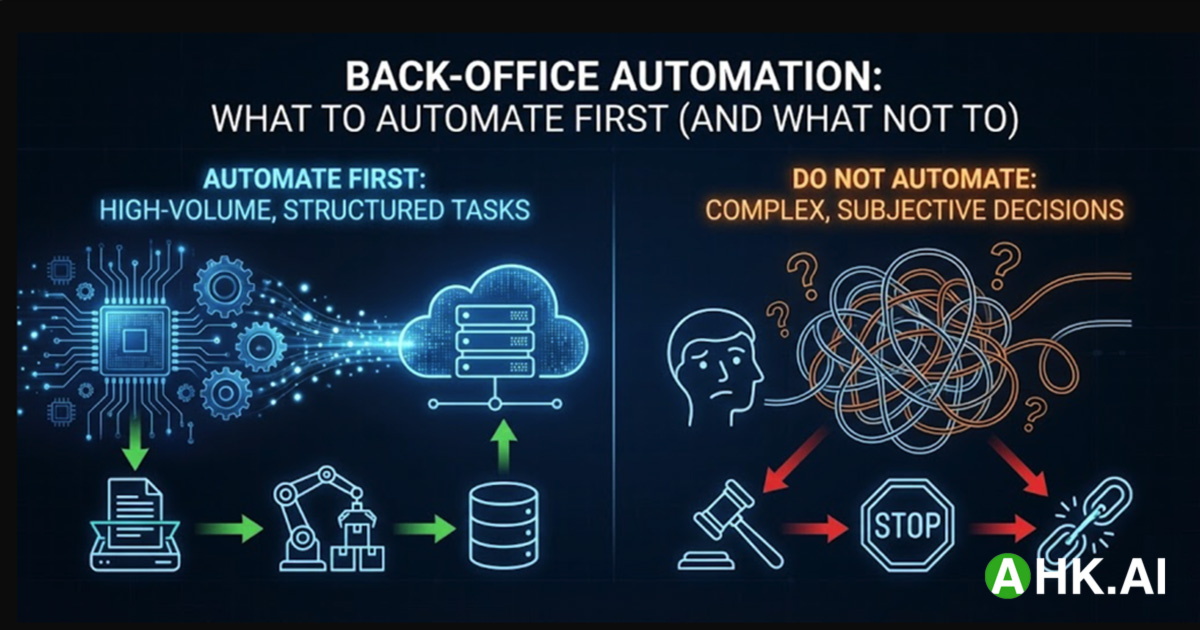
Back-Office Automation: What to Automate First (and What Not To)
Back-office automation can cut cost and cycle time—but only if you automate the right processes first. The most common failure pattern we see is “AI everywhere”: teams apply non-deterministic LLMs to workflows that require 100% data integrity, then spend months paying for exceptions, rework, and governance.
The better strategy is a tiered automation hierarchy: build deterministic “clean pipes” first, add AI where it creates leverage, and enforce validation + auditability throughout. This is especially important as automation potential expands with gen AI (McKinsey estimates up to ~30% of U.S. work hours could be automated by 2030 in some scenarios). McKinsey Global Institute
What to automate first (the rule of thumb)
Automate first when a process is:
- High-volume (daily/weekly)
- Rule-based (clear if/then logic)
- Structured (or can be reliably structured)
- Low exception rate
- Low blast radius if wrong
Defer automation when a process is:
- High-liability (legal approvals, safety-critical decisions)
- Liquid (changes every few weeks)
- Edge-case heavy with ambiguous inputs and unclear ownership
The engineering hierarchy: what to automate first in the back office

Tier 1: High-volume, structured work (quick wins)
These are tasks with near-zero ambiguity. If it’s strict logic over structured data (JSON/CSV/DB records), automate with APIs, webhooks, ETL, and workflow orchestration—not agents.
Best-suited Tier 1 processes:
- Payroll/HRIS data synchronization
- ERP ↔ WMS inventory updates
- Master data maintenance (vendor/customer records) with explicit rules
- Scheduled reporting (SQL → BI/email/Slack)
- Approval routing where policy rules are clear and stable
Architecture pattern:
- Event-driven pipelines (idempotency + retries)
- Stateless services/serverless (e.g., Lambda/Cloud Functions)
- Central logging + audit trails
AHK.AI field note: If an API exists, avoid RPA. UI automation creates UI-dependency risk that scales poorly and becomes a permanent maintenance tax—an example of “falling in love with a single technology” that Gartner explicitly warns against. Gartner: 10 Automation Mistakes to Avoid
Tier 2: Unstructured inputs → structured records (the intelligence bridge)
After Tier 1, the bottleneck is usually unstructured inputs: emails, PDFs, scans, attachments, free text. This is where AI is powerful—as an extraction and triage layer—but only when you treat it as a supervised component, not a source of truth.
Tier 2 pattern: AI Extract → Deterministic Validate → Route
- AI converts messy documents into a strict schema (JSON)
- Deterministic validators enforce math/logic constraints
- Exceptions are routed to human review
Non-negotiable safeguards (finance-grade):
- Invoice math:
Subtotal + Tax == Total - Currency/locale parsing rules
- Vendor match against master data before posting
- Duplicate detection (invoice ID/date/amount/vendor)
This “controls-first” approach aligns with risk-management guidance for trustworthy AI: governance, measurement, documentation, and lifecycle controls are essential. NIST AI RMF 1.0 (PDF)
Where Tier 2 typically delivers fast ROI:
- Accounts Payable invoice intake
- Expense claim extraction + policy checks
- Vendor onboarding documents (bank letters, tax forms)
- Contract metadata extraction (not approvals)
For evidence that organizations further along in intelligent automation see materially better outcomes than “pilots,” see Deloitte’s automation survey work. Deloitte: Automation with intelligence (2022 survey results)
Tier 3: Exceptions, decisions, and orchestration (agentic—guarded)
Only after Tier 1–2 are stable should you use agentic workflows for:
- exception triage
- knowledge retrieval + drafting
- multi-step orchestration across systems
Rule: keep human-in-the-loop for high-impact actions, require audit trails, and log evidence for every AI-driven decision.
What not to automate first (the red zones)
A) High-liability subjective reasoning
Examples: contract approvals, compliance sign-off, safety-related decisions, terminations. AI can summarize and draft; it should not approve without senior human review.
B) “Liquid” processes
If policy changes every 3–4 weeks, the hidden cost becomes continuous prompt/model updates, regression testing, and retraining—often exceeding the value of automation.
C) UI-only legacy systems (surface automation)
If there’s no API and automation depends on clicking screens, RPA brittleness becomes a structural cost. Often it’s better to replace the system, add an integration layer, or use human-in-the-loop for edge cases.
A practical prioritization matrix (how to choose what to automate first)
Score each candidate process 1–5:
- Volume (how often)
- Standardization (rules stable + explicit)
- Data readiness (structured or reliably structurable)
- Exception rate (edge cases)
- Blast radius (impact if wrong)
Start with: high volume + high standardization + good data readiness + low blast radius.
Production architecture: the AHK.AI supervised pipeline
-
Schema enforcement (no raw strings) Force model outputs into typed schemas (JSON schema / Pydantic). Reject/quarantine anything that fails validation.
-
Confidence thresholding (illustrative)
- ≥ 0.85: auto-execute (still validate + log)
- 0.60–0.85: route to human review
- < 0.60: reject and route to senior ops / fallback workflow
- Auditability by default Log: input artifact, extracted fields, validation results, model + prompt version, reviewer identity (if HITL), and final “write” action.
(If you want a governance baseline, NIST AI RMF is a solid reference for risk controls and documentation expectations.) NIST AI RMF 1.0 (PDF)
FAQ
Which back-office processes are best suited for automation?
Start with high-volume, rule-based, structured workflows (data sync, reporting, rule-based approvals). Then automate unstructured intake (invoices/expenses/emails) using AI extraction + deterministic validation.
What should companies automate first—Finance, HR, or Operations?
Typically finance ops + reporting/data sync provide the fastest ROI because they’re standardized, auditable, and high-volume. Use the prioritization matrix above to confirm based on your own exception rate and blast radius.
Should we use RPA, APIs, or AI agents?
- If an API exists → API/workflow first
- If inputs are unstructured → AI extract + deterministic validate
- If the work is exceptions/triage → agentic + HITL + logging Avoid the “single tool for everything” trap. Gartner: 10 Automation Mistakes to Avoid
What’s the biggest hidden cost in back-office AI automation?
Operational drift: model updates, changing data formats, new edge cases, and policy changes. Plan monitoring + regression tests + prompt/model versioning from day one.
About AHK.AI
AHK.AI is an enterprise AI automation agency building production-grade automation systems across go-to-market, financial, operational, and manufacturing functions at scale. Trusted by Fortune 500 and global enterprise organizations.